jeudi 30 juillet 2020

HMS Core 5.0 introduces an AR Engine, Computer Graphics Kit, Accelerate Kit and more improvements

Huawei Mobile Services, or HMS, is Huawei’s alternative to GMS, and it similarly consists of user-facing applications as well as core background services. HMS provides an experience that is consistent across devices and independent of the platform version. The HMS ecosystem is comprised of HMS Apps, the HMS Core, and the HMS Capabilities that the Core enables through its available APIs. The latest milestone update to HMS Core 5.0 introduces several APIs and improvements to existing APIs.

Huawei has doubled down on improving HMS Core and its allied services. After all, these services and service frameworks form the backbone of Huawei and Honor’s current experience. As of March 2020, Huawei’s global monthly active users has reached 650 million, representing an increase of 25% YoY. The number of registered developers on Huawei’s platform has also reached 1.4 million, a 115% YoY increase. And the total number of HMS Core apps has also exceeded 60,000 globally, which is a 67% YoY growth. Huawei is placing all of its bets on its own ecosystem, and the constant improvements in HMS Core are testimony to its long-term commitment towards the HMS vision.

HMS Core 4.0 was launched back in January 15, 2020, introducing new APIs in the form of the Map Kit, Machine Learning Kit, Scan Kit, WisePlay DRM, and more. Now, with HMS Core 5.0, Huawei is introducing some more new APIs: AR Engine, Computer Graphics Kit, Accelerate Kit.

AR Engine

Huawei AR Engine is equivalent to Google Play’s ARCore service. Thie AR Engine in HMS Core serves as a platform for building augmented reality (AR) apps on Android smartphones with HiSilicon Kirin chips. It integrates core algorithms for AR to provide basic AR capabilities such as motion tracking, environment tracking, and body and face tracking. With the AR Engine, you can build apps that bridge the virtual world with the real world.

In a nutshell, the Huawei AR Engine continuously tracks the device location and poses in order to provide motion tracking and environment tracking abilities. It makes use of the device camera to identify feature points in a given space, and then tracks the movement relative to these points, and subsequently integrates these changes with the data reported by the inertial sensor on the device. It can also recognize flat planes such as floors and walls, and it can also make an estimation of the lighting intensity around them when identifying feature points.

What makes Huawei’s AR Engine special is its ability to also enable movement tracking for humans. It can allow locating hand locations and recognize specific gestures. There is also a depth component within the API, which then comes together to let the API track as many as 21 hand skeleton points to implement precise interactive controls and special effect overlays. It can also track 23 body skeleton points to detect human posture in real-time, and Huawei envisages that you can use this data to build innovative apps around fitness and health too.

Computer Graphics Kit

The Huawei Computer Graphics Kit is a Vulkan-based high-performance computer graphics rendering framework. This framework consists of the PBR (physically based rendering) material, models, textures, light, component systems, and more. The idea behind the rending framework is to provide the best 3D rendering capabilities on Huawei devices that make use of HiSilicon Kirin chips. The framework also supports secondary development with reduced difficulty and complexity, which Huawei claims helps significantly increase development efficiency.

The Huawei Computer Graphics Kit can be used for 3D applications use cases as it encapsulates the necessary Vulkan API call methods, and also implements dedicated optimization on the Huawei GPU. This greatly reduces the workload in developing high-quality 3D static models. The Kit also provides for a high-performance multi-thread rending module that integrates the best practices in usage of Huawei-dedicated Vulkan enhancements and extensions. In essence, the Computer Graphics Kit helps accelerate the adoption of computer graphics in apps by offering developers the cutting edge tools they need to integrate the same into their software.

Accelerate Kit

The Huawei Accelerate Kit provides for multi-threaded acceleration capability that claims to efficiently improve the concurrent execution of multiple threads, thereby optimizing apps. This Kit opens this capability to developers as a set of C-language APIs. This will allow developers much more flexibility on current-generation Android devices that run on a multi-core setup. Multi-thread programming is generally achieved by controlling task execution by managing threads. With the Accelerate Kit, developers are freed from thread management details, so they can focus more on their own app while still gaining efficiency.

Audio Kit, Image Kit, Video Kit within HMS Core

HMS Core 5.0 also adds three new kits relating to the phone’s audio, video, and image capabilities. The Audio Kit enables audio playback capabilities based on the HMS Core ecosystem, including audio encoding, decoding capabilities at the hardware level and system bottom layer. The Image Kit allows you to incorporate scene-specific design and animation production functions into your app. The Video Kit currently provides for video playback capabilities, and work is on to incorporate video editing and even video hosting APIs in later releases. This will let you easily build apps that can play streaming media from an address provided by a third party.

Other upgrades to HMS Core

While the major focus of the version release is the new APIs, several new APIs are also getting new features. For instance, the Scan Kit now features deep learning-based scanning codes to improve scanning accuracy in more challenging situations with higher response speeds. The Map Kit has gained bus and subway route planning information, so developers can now use these to improve the functions within their apps. The Location Kit now supports fence management capabilities.


HMS presents itself as a window of opportunity for reducing your app’s reliance on Google services as well as an opening into Huawei and Honor’s device ecosystem, which still forms a substantial and unignorable part of the market. Huawei is in one of the rare positions of being able to offer a robust set of alternative APIs that provide a similar set of expected functionalities to both developers and users. Huawei intends to move ahead with HMS Core integration within its devices, so as a developer, can you really afford to ignore this important part of the market?

Check out all API Kits present in Huawei Mobile Services


We thank Huawei for sponsoring this post. Our sponsors help us pay for the many costs associated with running XDA, including server costs, full time developers, news writers, and much more. While you might see sponsored content (which will always be labeled as such) alongside Portal content, the Portal team is in no way responsible for these posts. Sponsored content, advertising and XDA Depot are managed by a separate team entirely. XDA will never compromise its journalistic integrity by accepting money to write favorably about a company, or alter our opinions or views in any way. Our opinion cannot be bought.

The post HMS Core 5.0 introduces an AR Engine, Computer Graphics Kit, Accelerate Kit and more improvements appeared first on xda-developers.


from xda-developers https://ift.tt/3jQA9ZH
via IFTTT

Selpic P1 – A portable handheld printer with limited uses

Have you ever wanted a portable printer? I’ll be honest, I don’t think the thought ever really crossed my mind before. What would I use a portable printer for? Turns out there’s actually quite a lot of uses for a portable handheld printer, which I realized after I received the Selpic P1 for review earlier this month. It’s a portable printer that you can control with your smartphone, letting you print phrases and images with just your smartphone and the printer pen. Is it as useful as it sounds? Well, that’s complicated. The Selpic P1 is currently running an Indiegogo campaign, where you can pick up the pen for $99 and a separate ink cartridge for $39. Once it properly launches, the pen will cost $199 and the ink cartridge will cost $59. The pen also comes with a black ink cartridge.

Selpic P1 Front Selpic P1 Side

About this review: I received the Selpic P1 for review from Selpic in early July. The company had no input in this review.

A portable printer is significantly more useful with visible ink

Selpic P1 printing on paper

First, there’s just one caveat to this review. The biggest issue that I had with the Selpic P1 wasn’t technical but the fact that the ink cartridge I received wasn’t black—it was yellow. As you can imagine, a yellow ink cartridge is rather useless for use on white sheets of paper, and in fact, has very few uses in general. The ink cartridges aren’t multi-coloured—they’re all one colour each. I asked for a black ink cartridge, but the company was unable to send one to me. As a result, some of the photos here are of poor quality as it can be hard to get yellow to show up on a page in any kind of appealing way. It’s also hard to brainstorm ways that this could be used as in its current state, it’s not very useful due to the colour of the ink.

Having said that, at the very least the Selpic P1 does work as intended. Yellow ink is just hard to see, and as such, it decreases the usefulness of the device by a lot. I would have loved to have had practically any other colour of ink just so that I could play with it more and maybe discover more use cases. I’m also skeptical about the white lines that seem to be printed as part of the image. Will this not cause issues for a barcode scanner? Seeing as one of the advertised use cases (and one I can see genuinely being useful) is that the Selpic P1 can print barcodes.

The Selpic P1 is mostly controlled through an (abysmal) app

Now that that is all out of the way, let’s move on to how the Selpic P1 is controlled. Everything happens pretty much entirely through an app on your smartphone. You connect your phone to it and all content to be printed is sent from your smartphone to the device via Bluetooth. The app is on the Google Play Store, though it can be a bit difficult to work out how exactly to connect it to the Selpic P1. I’ll be honest, the app isn’t well-designed and the process of even connecting the P1 to your smartphone is somewhat unintuitive.

There are three buttons on the Selpic P1, one of which is fairly pointless. Holding down the circular colored button on the back (above the USB-C port) puts the P1 in pairing mode. The long silver button is used to print whatever is stored in the Selpic P1’s memory. Finally, the gray circular button below that ejects the ink cartridge, which you can just pull out anyway as I’ve been doing.

There’s a “login” when first starting the app wherein you submit your email address. Am I actually logging into anything? Is there data associated with my “account” that anyone can access without a password? Not that I’m aware of, which is a little concerning to me. I didn’t notice anything obvious that the app may have pulled across to any devices that I tested on, so I’m confused by why it needed to collect my email.

When I asked my contact about this, I was told that the team “cancel[ed] the step of entering [the] password” that was originally required, since “people can’t get [the] verification code” yet. I assume what they meant by this is that they intended to have a login system with a password and verification code sent via text message, but they were unable to set this up. Instead, they’re simply logging you in by email address…without verification? In any case, I was assured that “this app doesn’t retain user information” in any way.

The app itself is used for updating the firmware of the Selpic P1 and also providing information about the device, along with the ink that’s loaded. Also, yes, it only works in landscape mode.

It also requires you to log into the same WiFi network that you are connected to by inputting your WiFi password when you first connect it to your smartphone. I don’t know why this is required as I was under the impression that the printer would work directly over Bluetooth. While I generally wouldn’t mind this too much, I’m already wary of the security of this application.

This app seems poorly designed and the UI is unintuitive. It doesn’t follow any of Android’s design language and the icons aren’t all self-explanatory. On the editing page, there’s a trash can icon next to the barcode symbol. You would think that button might clear what’s on the printer sheet, but no, it deletes the selected element. The paintbrush to its right is what clears the printer sheet, which I thought was a brush to allow you to draw on the printer sheet yourself. You can import an image as well for printing, but it’s… not great. I cleared the data of the app to get that screenshot showing the login page, and reconnecting the app to the Selpic P1 feels like a chore.

There are included images as well that you can add to the printer sheet, and they turn out okay on paper. Just like everything else from this device though, they’re small and hard to make out what they are. The ink colour doesn’t help either, as they appear even smaller due to their lack of distinction.

Selpic handy printer (Free, Google Play) →

The Selpic P1 has its uses, but they’re limited

I may have come across as harsh towards the Selpic P1, but that’s because it’s a product that asks for a lot of money when for most users, I don’t believe it’s useful. Those purchasing the product through Indiegogo will get a standard black ink cartridge, which makes more sense than the yellow cartridge I was sent. Non-black ink cartridges ought to be purchased separately. On top of that, the app itself needs major reworking. Besides the seeming lack of justification for asking for my email address, the UI isn’t well thought out. The Selpic P1 begins shipping worldwide in September, and if you really want one, you can check out the Indiegogo link below.

Selpic P1 on Indiegogo

The post Selpic P1 – A portable handheld printer with limited uses appeared first on xda-developers.


from xda-developers https://ift.tt/30aKGqB
via IFTTT

NVIDIA now lets you sync your Steam library to GeForce NOW, and adds 11 new games

NVIDIA’s GeForce NOW game-streaming service enjoys its share in the now-crowded game streaming market on the fact that it was one of the first to appear for end consumers. The service started beta testing for Android last year and opened up for everyone in February. NVIDIA had pledged to announce new games for GeForce NOW every week, and over the past months, it has kept to that promise. This week, NVIDIA is giving GeForce NOW 11 new additions, including titles like Far Cry 3, Life is Strange – Before the Storm, Magic the Gathering: Arena, and some new releases. NVIDIA is also making it easier to sync your Steam library to the service.

These are the eleven titles that have made their way to NVIDIA GeForce NOW this week:

  • Steam:
    • Blightbound
    • Hellpoint
    • Dead Age 2
    • Life is Strange – Before the Storm
    • Stationeers
  • Epic Games Store:
    • Far Cry 3
    • For The King
    • Magic the Gathering: Arena
    • South Park: The Stick of Truth
    • This War of Mine
  • My.com:
    • Warface

Amongst these, Blightbound, Hellpoint, Dead Age 2 are new game launches, having launched on July 29, July 30, and July 16 respectively on their platforms. Their addition adds freshness to the game streaming platform, so users don’t need to wait to play these games through the cloud. Along with the addition of new titles, NVIDIA has also added highlights support for Rainbow Six Seige, which will let users easily capture highlights from the game.

Further, NVIDIA is also adding in the ability to let users sync their Steam libraries to GeForce NOW by navigating to Settings > Game Sync. Once your Steam account is authorized, this feature will identify the games in the library that are supported by GeForce NOW and automatically add them to “My Library” within the app. You can also force a refresh any time you purchase a new Steam game.

Here are all the previous title additions to NVIDIA GeForce NOW:


NVIDIA GeForce NOW (Free, Google Play) →

The post NVIDIA now lets you sync your Steam library to GeForce NOW, and adds 11 new games appeared first on xda-developers.


from xda-developers https://ift.tt/309ZA0e
via IFTTT

Samsung Galaxy S10 family receives new updates with August 2020 security patches

Besides Google’s generic Android Security Bulletin (ASB), several major OEMs like Samsung maintain their own version of security bulletins. If you take a look at the Android section of Samsung’s Mobile Security portal, you can get a clear idea about all the disclosed security vulnerabilities affecting closed-source vendor components, the underlying Linux kernel in Android, and various OS frameworks that have been fixed by Samsung till date. At the time of writing this article, the latest monthly security patch level (SPL) is still listed as July 2020 on Samsung’s bulletin, but the OEM has already started rolling out the August 2020 security patches to the Galaxy S10 series in some regions.

XDA Forums: Galaxy S10e ||| Galaxy S10 ||| Galaxy S10 Plus

The version number of the new build is G97xFXXU8CTG4, and it is currently available for the international variant of the Galaxy S10 (model number SM-G973F) and Galaxy S10+ (model number SM-G975F), both powered by the in-house Exynos 9820 SoC. Interestingly, we can’t find a similar build for the Galaxy S10e (model number SM-G970F) as of now, but it should be made available very soon. The OTA update is available in the DBT region, which is Samsung’s code for Germany. The full changelog for the update is not available yet, but we do know that Samsung ships a new bootloader (v8) with this build. As a result, the end-users can’t perform a downgrade to older builds once they install this update.

Samsung is known for pushing out updates in batches. Even if you are in Germany, you might have to wait a couple of days before the OTA notification pops up on your device. If you’re comfortable with manual flashing, then you can use a community developed tool named Frija to download the updated firmware from Samsung’s repository. The required parameters can be found in the screenshot below:

samsung_galaxy_s10_august_2020_patch_frija

Thanks to XDA Senior Member henklbr for the screenshot

The decrypted firmware package created by Frija can be flashed using Odin on any regional Exynos Galaxy S10 model, not just the German one. Note that the U.S. and Canadian Snapdragon 855-powered variants of the Galaxy S10 are not compatible with the aforementioned update.

The post Samsung Galaxy S10 family receives new updates with August 2020 security patches appeared first on xda-developers.


from xda-developers https://ift.tt/39CKiV4
via IFTTT

mercredi 29 juillet 2020

Google One app for Android now offers free phone backups

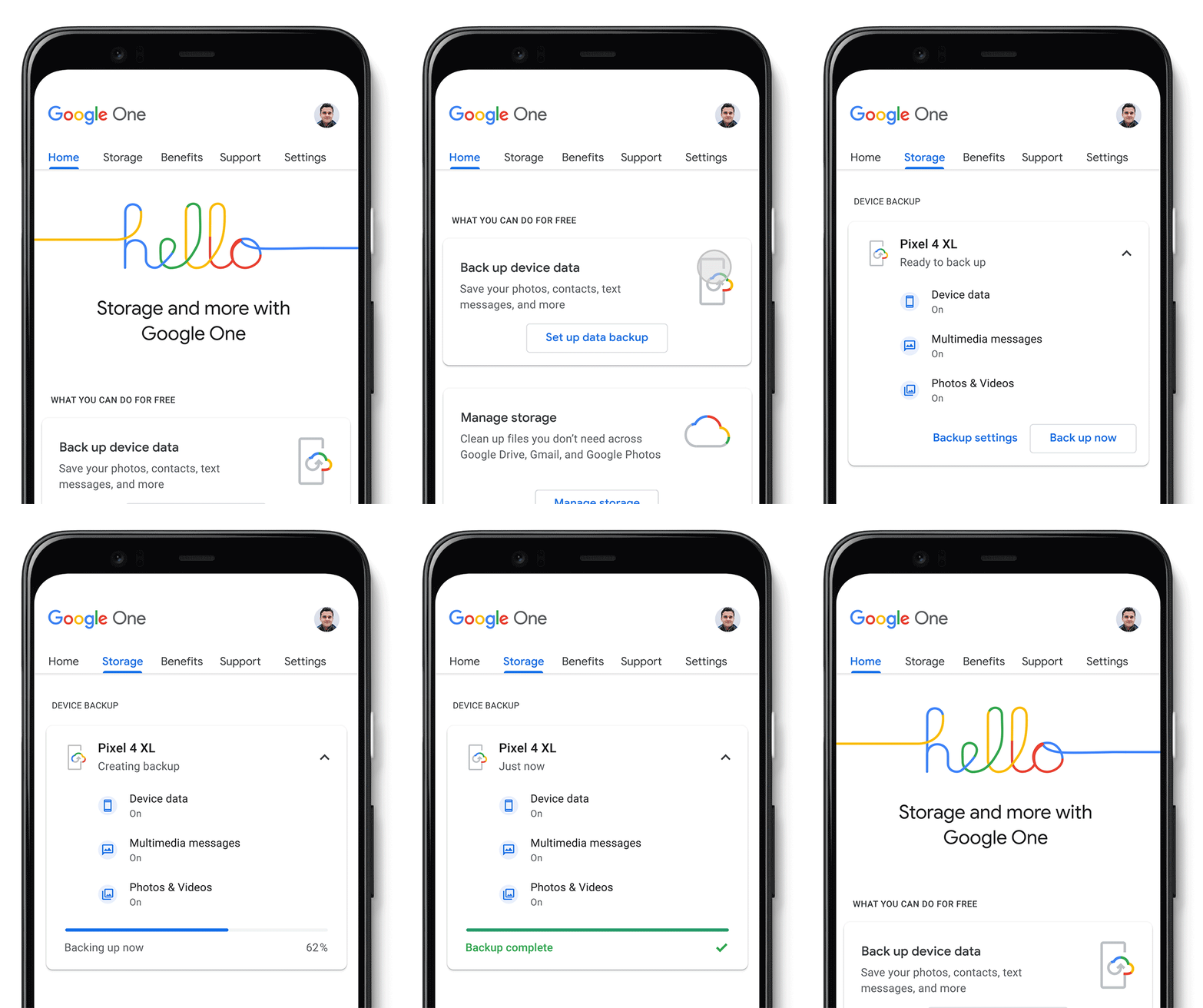
Google One, Google’s unified cloud backup service, offers subscribers the ability to automatically back up device data, multimedia messages, photos, and videos from their Android devices. Starting today, that same feature is being extended to all Android users free of charge.

The backup feature is a convenient and worry-free way to preserve your texts, contacts, apps, photos, and videos. And it’s all automatic, so very little work needs to be done by users. If you wind up breaking, losing, or upgrading your device, all of your important information will be saved in the cloud. Most Android devices already support backing up data to the cloud thanks to Google Play Service’s backup manager service which uploads files to a private directory on users’ Google Drive accounts. However, this backup solution doesn’t sync MMS or photos and videos in original quality, which is a perk available from Google Photos/One.

In addition to the free backup feature, Google is also introducing a storage manager, which will be available in both the mobile  app and online. This will allow users to delete files from across the various services that One supports, including Google Drive, Gmail, and Google Photos, in order to free up space. You get 15GB of free storage with a Google account, and it’s $1.99/month for 100GB of data on Google One after that.

As usual, One allows subscribers to share their plan with up to five additional members, so if you do need more than 15GB of storage but not quite 100GB or more, you can split the extra storage space with your family members. That’s a nifty incentive to upgrade. A membership also features premium support, Google Play credits, and Google Store member rewards. There are also hints that a subscription will be required to access premium editing features in Google Photos, but we haven’t seen that come to fruition just yet.

Google said it’s also planning to launch a Google One app for iOS soon, so iPhone users will also get free automatic backups. The Android app is available from the Google Play Store right now.

Google One (Free+, Google Play) →


Source: Google

The post Google One app for Android now offers free phone backups appeared first on xda-developers.


from xda-developers https://ift.tt/3f5Msxu
via IFTTT

OnePlus phones may finally get an always-on display with Android 11-based OxygenOS 11

Earlier this year, OnePlus finally committed to bring an always-on display feature to OxygenOS. Now, with the stable release of Android 11 coming in September for Pixel phones, OnePlus is teasing that they will introduce an AOD feature in the company’s OxygenOS 11 update.

OnePlus founder and CEO Pete Lau teased the feature with a cheeky Tweet, which you can view below.

While Lau doesn’t explicitly say AOD is coming to OxygenOS 11, it’s hard not to make that conclusion considering OnePlus already committed to bringing the feature to its devices. In fact, it has been one of the community’s most-requested features for months now. Back in March, OnePlus officially added the feature to its software roadmap after overcoming initial power consumption tests. “We are working on fine-tuning AOD to make sure it is perfectly optimized,” said Gary C., an OxygenOS operations staff member.

OnePlus said it has entertained the idea of an AOD feature for a while, but it was apprehensive to release anything official due to power consumption issues. The company explained that AOD “could roughly consume about 350-500 mAh of the batter, which means you might get one or two hours deducted from your daily usage.”

Even still, OnePlus said that people deserve the option if they want it, and considering many popular Android devices already offer an always-on display feature, the company no doubt wanted to bring further feature parity to its devices.

Lau doesn’t provide an exact release date for the always-on display option, but with Android 11 set to drop on September 8, we could see the feature be available shortly after. Last year, OnePlus released an OxygenOS 10 stable update in September, so if history is anything to go by, OxygenOS 11 will begin rolling out in a matter of weeks.

The post OnePlus phones may finally get an always-on display with Android 11-based OxygenOS 11 appeared first on xda-developers.


from xda-developers https://ift.tt/2X8feaO
via IFTTT

Realme 2 Pro and Realme 5/5s/5i Android 10 kernel source code now available

BBK Electronics’ Realme brand spun out of OPPO, but the brand’s Realme UI is still closely tied to OPPO’s ColorOS software. With the Android 10 update, Realme has introduced its self-branded Realme UI OS to many of its devices. The brand has been gradually publishing updated kernel sources corresponding to those releases. Now, the brand has now posted Android 10-compatible kernel source code for the Realme 2 Pro and the entire non-Pro Realme 5 family that includes the Realme 5, Realme 5s, and the Realme 5i.

Realme 2 Pro

The Qualcomm Snapdragon 660-powered Realme 2 Pro already has a rich aftermarket development community, made possible by the early kernel source drop from Realme. The phone picked up its stable Android 10 update about a month ago. However, the kernel source code corresponding to the update wasn’t made available up until now. You can visit Realme’s GitHub repo at the link below to download the updated source code (all without a proper commit history).

Realme 2 Pro Android 10 Kernel Sources ||| Realme 2 Pro XDA Forums

Realme 5/5s/5i

The Realme 5 and the Realme 5s share a common firmware due to their internal similarities, which means the existing Android Pie-based kernel source for the Realme 5 is somewhat suited for the Realme 5s as well. Despite sporting the same Qualcomm Snapdragon 665 SoC as the Realme 5/5s, the Realme 5i needs its own firmware, although there is very little difference between these devices. That’s why Realme has released the updated kernel source code for the Realme 5i in the same branch as the Realme 5/5s’s release rather than under its own branch as they did earlier this year. Check out the unified source below.

Realme 5/5s/5i Android 10 Kernel Sources ||| Realme 5 XDA Forums

Apart from the lack of commit history, Realme is known for publishing broken and/or incomplete source code. They are still not as swift as OnePlus when it comes to releasing and keeping the kernel sources up-to-date, but at least they are in a much better position than OPPO and Vivo, the two other companies owned by BBK Electronics.

The post Realme 2 Pro and Realme 5/5s/5i Android 10 kernel source code now available appeared first on xda-developers.


from xda-developers https://ift.tt/2P8S7s9
via IFTTT